
Chatify / Knowledge & conversations
AI answers from your organisation’s knowledge.
Chatify is an AI knowledge assistant for teams handling recurring questions. Bring your documents and FAQs into a multilingual conversation experience, with human handoff when a question needs your team’s attention.
The product
What is Chatify?
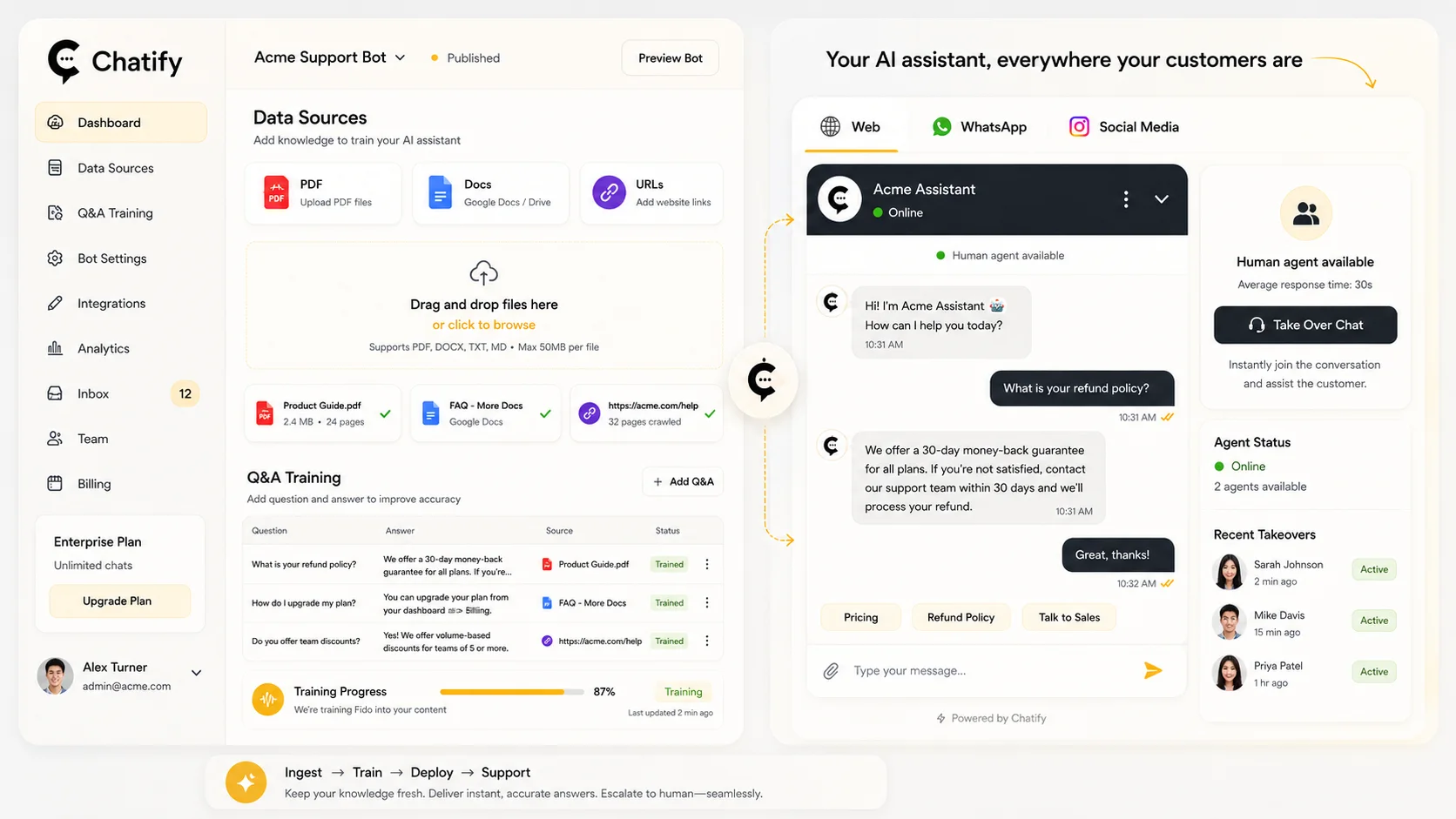
Chatify connects organisational knowledge with everyday questions. It helps teams organise source material, prepare AI-assisted answers and review conversations in one workflow.

Your knowledge, within reach
Use service guides, policies, product information and frequently asked questions as the starting point for answers.
Conversations with context
Help people find relevant information in Cantonese, English or Mandarin. Test terminology and tone against your audience before launch.
People stay involved
Define which questions the assistant should handle and which should move to your team. AI responses still need testing and ongoing review.
How it works
See how knowledge supports a response.
An illustrative example: find relevant source material, compose a draft response and check its source. Your team defines what the assistant can answer and when it should refer to a person. Not a live product screen.
Choose approved sources
Identify the documents, website content and FAQs the assistant may use. Remove outdated or sensitive material and assign an owner to keep the sources current.
Set answer boundaries
Test realistic questions, local language and missing-information cases. Agree what the assistant should not answer and when a person should take over.
Plan ongoing review
Choose the channel and any integration, then assign responsibility for reviewing conversations and updating the knowledge.
Capabilities
A clear workflow for your support team.
Bring knowledge, conversation and review together. We will demonstrate the features and integration requirements relevant to your use case.

Knowledge management
Organise source documents and FAQs so the assistant can use relevant information. Establish content owners and a review schedule.
Channel integration
Discuss website chat, WhatsApp and other messaging requirements. Availability and setup depend on the channel and your deployment.
Human handoff
Plan how complex or sensitive enquiries reach staff, including what conversation context the team needs to continue helping.
Conversation review
Review recurring questions and information gaps. Use these findings to improve your knowledge base and service experience.
Where it helps
Built around the questions people actually ask.
These are example use cases, not claims of completed Chatify deployments or measured results.
NGOs & social services
Explain service availability, programme details and enquiry routes. Personal case decisions and urgent needs should follow a defined staff escalation process.
Customer support
Help customers navigate product information and routine policies. Order lookups or account actions require the appropriate system integration.
Education & admissions
Make course guides and admissions information easier to explore. Route eligibility exceptions and personal applications to the admissions team.
Data & control
Agree the boundaries before you launch.
Security is a deployment decision, not a headline promise. During discovery, confirm the data, hosting, model providers and operational controls required by your organisation.

What information is available?
Agree which documents may be used, who maintains them and what information must stay outside the assistant.
Where does data go?
Confirm hosting location, model processing, retention, deletion and provider data-use terms for the selected deployment.
When should staff step in?
Define sensitive topics, unsupported questions and escalation routes. Retrieval can improve relevance but does not eliminate incorrect answers.
Questions & answers
Before you get started.
Practical answers about Chatify, integration and getting your team ready.
What is Chatify used for?
Chatify is an AI knowledge assistant for recurring organisational questions. Teams can use it to make documents and FAQs easier to explore, then direct questions needing judgement or further support to a person.
Can Chatify answer in Cantonese?
Chatify supports multilingual conversations, including Cantonese, English and Mandarin. Test your organisation’s terminology, tone and common questions during the demonstration and pilot.
What documents can we use?
Discuss your PDFs, Word documents, spreadsheets, website content and FAQs with us. We will confirm supported formats, preparation requirements and any limits for your deployment.
What happens when the assistant cannot answer?
Define a fallback and staff handoff process before launch. Missing or uncertain answers should be reviewed, and the underlying knowledge improved rather than treating every generated response as correct.
Can it connect to our website or WhatsApp?
Website chat and WhatsApp are integration options to discuss during scoping. Confirm account requirements, channel availability and any additional setup or provider costs for your chosen deployment.
How is our data handled?
Data handling depends on the selected hosting, model and integration setup. Confirm access controls, processing locations, retention, deletion and provider training terms with i2 before sharing confidential material.
How long does implementation take?
Timing depends on content readiness, integrations, review requirements and testing. Start with a focused demonstration and agree a pilot scope; there is no single setup time that fits every organisation.
How can we arrange a Chatify demo?
Contact i2 with your intended audience, common questions and preferred channels. Use non-sensitive sample documents to help us plan a relevant demonstration and discuss scope and pricing.
Related products
Explore another part of your workflow.
DocSnap
Turn document-processing requirements into a focused discussion.
MinutesMax
Explore audio transcription and meeting analysis.
TalentSift
Explore screening, interview and staff-development workflows.


 Contact Us Now